
Gangsta's Paradise AI Video Generator from Two Photos
Use getairap to cast two photos as the lead rapper and chorus singer on a blue-lit choir stage, and generate one 15-second silent MP4 for your own soundtrack.
Preview both photos for free. Sign in to generate with one video credit.
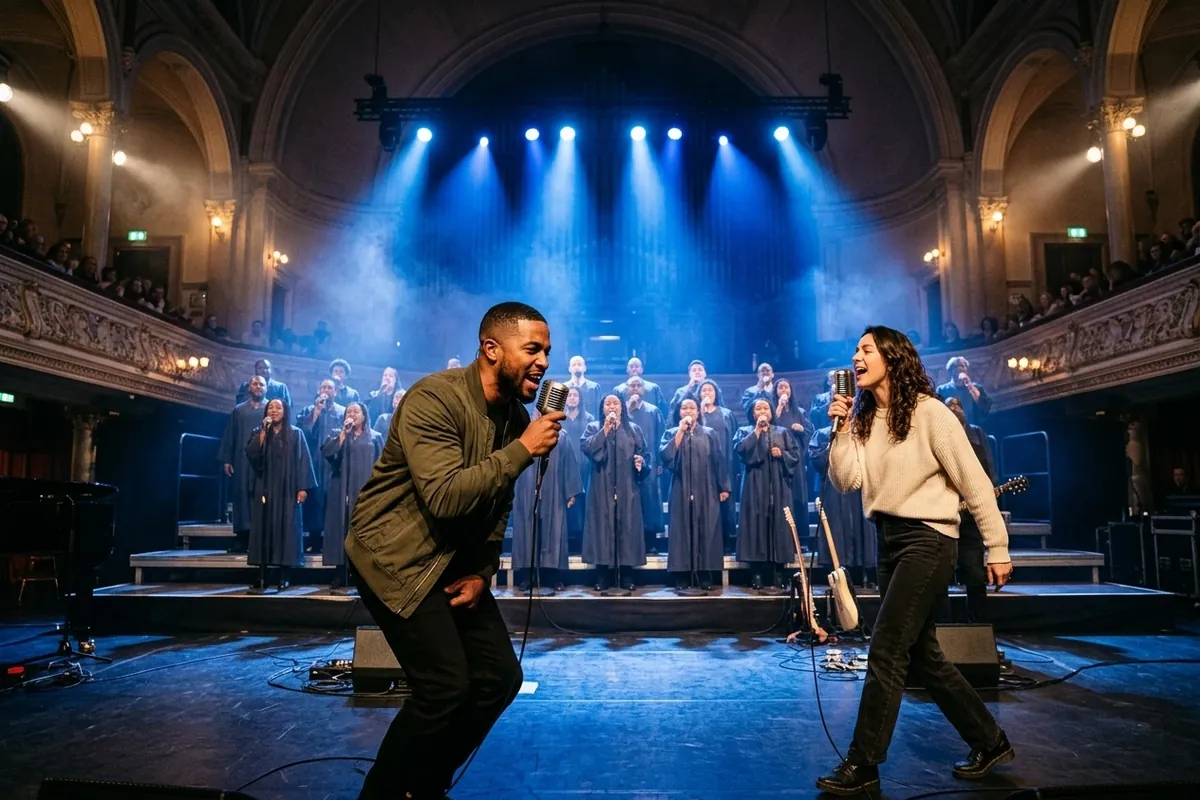
Assign the verse lead and chorus entrance
The trend builds on a clear handoff: one person opens alone at the microphone under blue spotlights, and the second person walks onto the stage to belt out the soaring chorus backed by a robed choir.
- Photo 1Lead rapperDevon · Grips the handheld mic center-stage and delivers the opening bars.
- Photo 2Chorus singerClaire · Walks onto the blue-lit stage at 4 seconds and belts out the chorus.
Choose two clear adult portraits
Use one head-and-shoulders photo per consenting adult, with both eyes and the mouth unobstructed. Avoid sunglasses, heavy face filters or extreme side angles. If your two subjects are in one group shot, crop each face into a separate portrait before uploading.
Use JPG, PNG or WebP up to 10 MB per photo and 24 megapixels. Each side must be 301 to 5,999 pixels, with a width-to-height ratio greater than 0.4 and less than 2.5.
Previewing keeps photos on your device. Saved creation photos stay private for up to 24 hours. getairap and SeeAPI process submitted photos for safety checks and rendering, and you can request deletion of stored photos and videos. Photo storage and deletion
Generate a 15-second choir-stage duo
- Assign the lead rapper and chorus singer. Upload one clear adult portrait per role. Put the opening mic performer in Lead rapper (Photo 1) and the dramatic stage entrance in Chorus singer (Photo 2).
- Generate one 15-second choir-stage clip. Review both roles, sign in and confirm generation for one video credit. Choosing Buy credits & generate from your saved creation continues that video after confirmed payment; buying a pack directly on Pricing only adds credits to your balance. getairap renders one silent 15-second clip at 720p in 9:16.
- Check status, download and add your sound. Follow the workbench status or reopen the request from My Videos. Download the watermark-free MP4, then add a permitted sound in TikTok, Reels or Shorts and align the chorus drop to the 8-second cut.
The workbench link tracks the same request across reloads. A confirmed failed render returns the reserved credit to your balance (not a cash refund of the pack); pending requests hold the credit until resolved. Open My Videos · Credit return policy
Watch the two-photo choir-stage example
Input photos in upload order
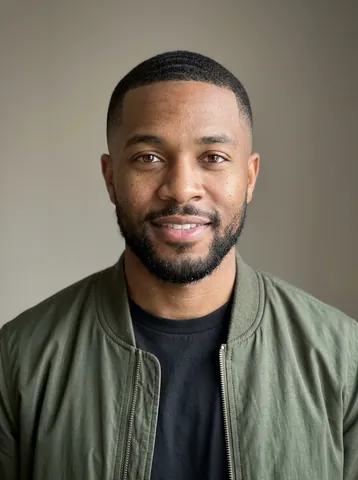 1. Lead rapperDevon
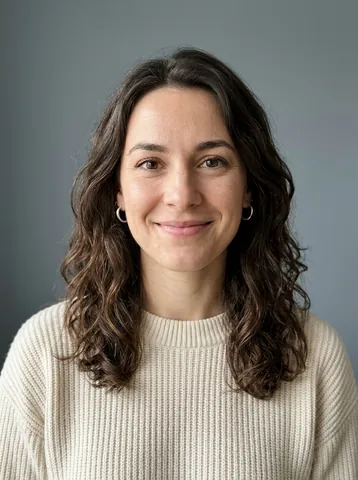 2. Chorus singerClaire
Two synthetic portraits in one 15-second silent Seedance 2.0 render made directly with SeeAPI. The lead rapper opens at the handheld microphone, the chorus singer enters from stage right, and both perform together in front of the robed choir.
The final frame was trimmed to 15 seconds.
Example prompt and four-shot timing
Use this prompt and the planned shots below to direct your own two-photo render through SeeAPI.
Set the scene on a dramatic cobalt-blue concert stage backed by two tiered rows of a robed gospel choir under volumetric blue spotlights. Cast two adults. Place @Image1 center-stage at a vintage handheld microphone as the lead rapper, and cast @Image2 as the chorus singer who enters from stage right. Keep each person’s face, hairstyle and outfit consistent with their reference photo across every cut. Frame vertically in 9:16 with clear, unobstructed faces in medium and two-shot angles. Have @Image1 rap with confident rhythmic intensity during the opening bars, then bring @Image2 up beside the mic to belt out the soaring chorus while the robed choir sways and sings behind them. Use natural blinks and varied mouth movements as they perform. Deliver a silent video with a clean frame free of text, subtitles and logos.
- 0–4sOpen on @Image1 gripping the handheld microphone under deep blue stage beams, rapping intensely while the robed choir stands poised behind.
- 4–8sCut to a side-angle medium shot as @Image2 walks purposefully onto the blue-lit stage while @Image1 finishes the opening verse.
- 8–12sFrame @Image2 stepping up to the microphone to belt out the dramatic chorus as the background choir sways and sings in unison.
- 12–15sPull back to a vertical two-shot of @Image1 and @Image2 side by side in front of the illuminated choir for the final crescendo.
Compare two-photo choir-stage tools
Choose getairap when you want to assign who raps first and who enters for the chorus, pay for one video without a subscription, and attach a permitted track when you post. Each service maintains a separate credit balance.
Render directly with SeeAPI
From your backend, send POST /v1/generations with your SeeAPI key and a unique Idempotency-Key. Select seedance-2 and reference-to-video, pass two readable portrait URLs in role order as reference_images, and set duration_seconds to 15, aspect_ratio to 9:16, resolution to 720p and generate_audio to false.
Poll GET /v1/generations/{task_id} with the returned generation.id and download the MP4 once it succeeds. SeeAPI task details · SeeAPI photo retention
Add sound after you download
Import the silent MP4 into TikTok, Instagram Reels or YouTube Shorts and pick a sound permitted for your account. Line up the chorus entrance with the 8-second cut where Performer 2 steps to the microphone. If you want an original beat and two AI voices instead of a silent stage template, open the AI Rap Duo creator or compare original rap vs lip-sync workflows. Have four friends instead of two? Try the Walk It Like I Talk It carpool tool. Terms of Service
Frequently asked questions
What is the Gangsta's Paradise AI video trend?
It’s a two-photo AI performance format that started circulating on Reels and TikTok in early November 2026. Photo 1 raps the opening verse into a microphone under dramatic stage lighting, while Photo 2 walks onto the stage and steps up to belt out the chorus in front of a robed backing choir.
Who performs the original 1995 song?
Coolio performs “Gangsta’s Paradise” featuring L.V., released in 1995 for the Dangerous Minds soundtrack and built around Stevie Wonder’s “Pastime Paradise.” getairap does not distribute or embed that recording.
How can I make the two-person choir video for free?
Film two friends in dramatic blue lighting—one starting at the mic and the second walking into frame for the hook—and cut it to 15 seconds in your phone’s editor. On getairap, selecting and previewing both photos is free; AI video generation uses one paid video credit.
Does the downloaded MP4 include the song or exact lip-sync?
No. getairap exports a silent, watermark-free 15-second MP4 so you can attach a licensed sound inside TikTok, Instagram Reels or YouTube Shorts. Word-level lip-sync requires audio-driven rendering; adding a track after export aligns the beat and chorus entrance with the four planned cuts.
Can I generate an original rap duet with vocals instead?
Yes. If you want newly generated lyrics, a beat and two AI voices that take turns rapping, open the AI Rap Duo creator on getairap. The same non-expiring video credits work across both modes ($9.90 single, 3 videos for $19.90; 5 videos for $29.90, or $4.90 within 24 hours of signup for eligible new users, once per person).
Is getairap affiliated with Coolio or the song’s rights holders?
No. getairap is an independent AI video tool and is not affiliated with, endorsed by or sponsored by Coolio’s estate, L.V., Tommy Boy or any music copyright holder.
Independent fan-trend tool: getairap is not affiliated with Coolio’s estate, L.V., Tommy Boy or the song’s copyright holders, and does not host or distribute the original audio recording. Official 1995 music video on YouTube